Can we afford to design in a vacuum?
I came across an article in a recent New Scientist issue (4 August 2007), where they interviewed 2 retired Apollo programme engineers from Grumman Corporation. (Grumman built the lunar module for the first manned moon landing 38 years ago.)
The engineers’ reply to the first question stood out to me:
Q: How closely did you work with the Apollo astronauts?
Gerald Sandler: Very closely. They would continually come into Grumman and they were on the inspection teams for the vehicles. Everyone who was working on the lunar module saw them personally and recognised that their lives depended on what we were doing. Having the astronauts involved and very visible played a key part in ensuring that people felt personally responsible. That was one of the reasons why the quality levels where so high.
Joe Mulé: Whenever a problem wasn’t getting attention I had a guy working in my group who used to say: “Are you going to tell the widows?” It was something we always kept in mind.
This reminds me of what I said in a recent post on intranet design and governance:
As part of the research, we had to conduct many interviews with different staff, to understand their work habits, their informational needs, and so on. As of now, we’ve interviewed close to 10% of all staff.
Personally, those interviews weren’t just to find out what problems needed to be solved or even to understand the users – what was more important was that those interviews gave me an opportunity to have personal contact with those who will be using the intranet that I’m redesigning, to actually care about them. I’m not redesigning the intranet for some faceless silhouetted entity called the user; I’m doing it to help make the lives of these nice people a better.
The longer I’m in the field of design, the more I see the importance of first-hand interaction with the clients and final users.
More so because I’ve also seen instances where the designers were “designing in a vacuum”.
I know of this web project done by a large web design company where the web designer never got to meet or have any contact with the client. Everything went through the project consultant.
The designer was simply asked to create the design based on a given layout, and so they did, to the best of their ability.
It was obvious from the design that the designer didn’t grok or have an understanding of what the client the final users needed.
So, that marked the beginning of a long and frustrating process of redesigning and rejecting and re-redesigning and re-rejecting.
Perhaps, that web design company wanted to save costs – it is costly to get the designer involved in attending meetings with the clients and the final users.
But it’s even more costly for them not to do it. Costly not just in terms of the effort in redesigning, but even more in terms of branding, where the client becomes displeased with the whole experience.
Rather than asking if we can afford to let the designer spend time meeting clients and users, we should be asking if we can afford not to do it.
Grammar Made Interesting
I’ve been interested in how grammar can be taught in an interesting and engaging way, and I sometimes use manufactured fairy tales as a teaching technique (for other concepts), so I was quite pleased to find a grammar fairy tale, The Grammarian’s Five Daughters by Eleanor Arnason.
Once there was a grammarian who lived in a great city that no longer exists, so we don’t have to name it.
It first introduces nouns:
The oldest daughter thought a while, then opened her bag. Out came the nouns, sharp and definite. Sky leaped up and filled the grayness overhead. Sun leaped up and lit the sky. Grass spread over the dim gray ground. Oak and elm and poplar rose from grass. House followed, along with town and castle and king.
Then it goes on to cover verbs, adjectives, adverbs, and prepositions.
I can’t really tell how effective this is, but it’s certainly a great effort, and might be worth trying on schoolkids.
Since we’re on the topic of grammar made interesting, The Deluxe Transitive Vampire by Karen Elizabeth Gordon is probably the best (and most humorous) I’ve read (and owned).

Gerunds as Objects of Prepositions:
By being so pregnant with meaning, her announcement went over like a lead balloon.
Through sporting a cudgel, the Neanderthal made a rude but necessary start.
By dunking her crumpet in the marmalade, Melissa committed a midafternoon faux pas.
In finding the chink in his armor, she found herself shown to the door.
It’s been years since I’ve read it. I’m tempted to read it again.
The Future Internet
Some time ago, I argued that the future internet will not be virtual 3D worlds. So a number of people have asked me what I thought the future internet will be like.
The answer: the Semantic Web.
It’s an abstract concept, and definitely not as sexy as a 3D virtual world.
Tim Berners-Lee, inventor of the World Wide Web, talks about it in an interview, The future of the Web as seen by its creator.
So, for example, if you are looking at a Web page, you find a talk that you want to take, an event that you want to go to. The event has a place and has a time and it has some people associated with it. But you have to read the Web page and separately open your calendar to put the information on it. And if you want to find the page on the Web you have to type the address again until the page turns back. If you want the corporate details about people, you have to cut and paste the information from a Web page into your address book, because your address book file and your original data files are not integrated together. And they are not integrated with the data on the Web. So the Semantic Web is about data integration.
When you use an application, you should be able to put data there so that you could configure that data. I should be able to inform my computer: “I’m going to that event.” And when I say that, the machine will understand the data. The Semantic Web is about putting data files on the Web. It’s not just a Web of documents but also of data. The Semantic Web of data would have many applications to connect together. For the first time there is a common data format for all applications, for databases and Web pages.
Intranet Design and Governance
Over the last 3 months, one of the projects we’ve been working on at PebbleRoad is the revamp and redesign of a client organization’s intranet.
The organization has over 700 staff, most of them at the headquarters, but a significant number of them in their other locations spread all over Singapore.
The role of PebbleRoad was to conduct research, then redesign the structure and the layout (wireframes) for the new intranet based on the research. Another company would then use our design to do the actual implementation of the intranet.
We’re almost finished with our part. Although I can’t divulge too many details at this point, it’s been a fun and fulfilling ride so far.
As part of the research, we had to conduct many interviews with different staff, to understand their work habits, their informational needs, and so on. As of now, we’ve interviewed close to 10% of all staff.
Personally, those interviews weren’t just to find out what problems needed to be solved or even to understand the users – what was more important was that those interviews gave me an opportunity to have personal contact with those who will be using the intranet that I’m redesigning, to actually care about them. I’m not redesigning the intranet for some faceless silhouetted entity called the user; I’m doing it to help make the lives of these nice people a better.
Which makes the work alot more meaningful. It makes me want to do a better job.
But creating a wonderfully-designed intranet is only the start. What is equally important is how the intranet is cultivated, so that the benefits of the intranet can be maintained or increased, in symbiosis with the organization itself.
To help with that, we produced an intranet governance guide:
This guide describes a set of processes that need to be in place and a set of actions that need to be taken to sustain and grow the intranet. Without these guides and checks, we risk diluting the very efficiencies and productivity gains that the intranet is designed to provide.
My colleague and I had much discussion over this guide. I hope it’ll be useful for others who are maintaining intranets, or are planning to do so.
Why BlogOut Was So Noisy
BlogOut was too noisy.
Sure, noise can be a good thing at the right time, when ideas are flowing, but when there’s a panel discussion going on in front of the room, and most of the (interested) audience can’t hear what’s going on, you have a problem (astro described the situation in his post, Blogout or SpaceOut?).
So, why was it so noisy?
Crowd control, or the lack of it.
When the MC started the event proper, she didn’t manage to get everyone’s attention. There were still pockets of people standing and chatting at the rear area.

(photo from Kevin Lim)
It’s easy to expect the crowd to quieten down and pay attention eventually (I would have expected that myself), but it didn’t happen. On hindsight, the MC should have gotten the attention of everyone before starting.
Which would have helped for around 10 minutes at most, before those standing in the background resumed their conversations. We know that because the MC did ask pretty firmly for everyone to “be respectful” during the panel discussion. The success rate was around 80%, for around 5 minutes.
Mainly because there was a bigger factor at play:
The lack of chairs, or too many people standing in the background.
When you’re standing in the background in an event like that, it’s easy to feel like you’re not part of the seated group, meaning that you’re somehow excluded from the social norms and rules of that group.
I know because I’ve done that too many times myself.
Being excluded from the seated group, and part of the outsider group, there’s little inhibition from making a comment or two to the person standing beside you. And because you’re standing, it’s so easy to be facing your comment partner rather than the front of the room.
The perfect setup for a “backchannel” conversation.
There are a couple of other minor factors that I suspect have contributed in minor ways to the rather noisy atmosphere, like the arrangement of seats, the shape of the seats, and maybe even the presence of the food, drink, and waiting staff, but since they are minor, I shall refrain myself.
I hope this post gives some insight into the design of an event space, and the human dynamics within it. And hopefully, there will be enough seats next time 🙂
Kudos to the organizers. I still think they did well.
Update:
I completely missed out another major point – the poor sound system, although it was fine where I was (near the front). Thanks to Du Senyao Peter who pointed it out in the comments:
Though I think a major problem is with the sound system, which could not amplify the talking one’s voice very well so people at the back could not feel the presence of the one who is talking, be it emcee or the panelists
Forms Created by Nazi Developers
I was doing a bit of research on a site, and had to fill in a form. It was an application form for a university course.
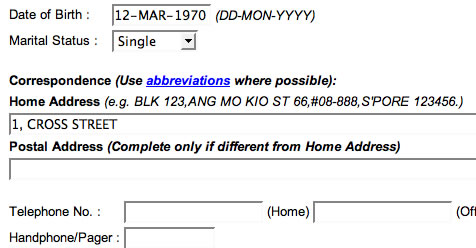
As you can see above, I had filled in an address in the “Home Address” field.
Then I got this Javascript error message:

“Must end with a full-stop, have at least 1 but not more than 3 commas”? Amazing. Perhaps this is just a way to filter out applicants who have a poor comprehension of English.
Undaunted, I obediently added the missing “full-stop” to my fictitious address (even though I could have turned off Javascript instead), so it became
1, CROSS STREET.
(Note the “full-stop” I dutifully added. Also, it’s in CAPITAL LETTERS because the Javascript converted it so.)
Perfect.
Until I tried to submit the form, where I was greeted with another Javascript error:

I couldn’t stop laughing.
The real applicant probably wouldn’t be laughing though.
Discover Podcasting & Vodcasting
“How about YOU?”
So said one of my PowerPoint slides, as I threw out this challenge at the librarians attending my course on podcasting and vodcasting last tuesday.
By then, they had already learnt what podcasts (and vodcasts) were, how to find podcasts, how to subscribe to podcasts in iTunes, how to create a podcast using Audacity and ClickCaster, and how to upload a video clip to YouTube.
But learning about podcasts and vodcasts and YouTube videos, or even knowing how to create them, wasn’t quite enough – I wanted to encourage and inspire at least a few of them to actually go out and do something, to create something, whether on their own or with colleagues. Not an easy thing to accomplish in a 4-hour session, especially where most of them didn’t know what a podcast was when they stepped into the room.
Thus that challenge for them to go out and do something.
To help them a step further, we did a sort of sticky-storming activity – we got all of them to come up with podcast or vodcast ideas, write down each idea on a sticky note, and paste them on the wall. When everyone had their ideas stuck on the wall, they would look through the ideas and put a marking on those ideas they found interesting. The most interesting ideas would then have the most markings. (I’ll post photos of this activity as soon as I have access to them.)
When that activity was done, I asked the librarians if any of them would be interested in committing some time or effort in doing a podcast or vodcast. One lady raised her hand enthusiastically. Sensing their reticence, I asked the rest who were interested just to nod their heads as an indication, and many did – many more than I hoped for, which was really encouraging.
The compiled evaluation from the participants, which came in earlier today, was encouraging as well. Here are the compiled comments:
Liked Best:
Practical work – setting up podcast (6)
The relative informal way the course was conducted was refreshing. The topics were new to us therefore novel and interesting.
Various examples given.
The topic is interesting.
The video shown stimulated interest in subject.Needs improvement:
More on what types/categories of information available in podcast/vodcast.
Step by step written guide from software to recording and posting.
Examples of joint work, where not everyone was accessing same links.Other comments:
Well conducted course. Short and sweet.
And for those who like numbers, the average subject score was 4.5 out of 5, and the average trainer score was 4.6 out of 5. Librarians are so generous!
Anyway, now that some of the groundwork has been laid, and with some interest coming from the ground, I hope to see some interesting “new media” projects coming out of NLB in the near future.
Special thanks to those who’ve helped and contributed in one way or another, including Rajen and Ween from NLB Academy, Ivan from NLB, my colleague Maish, and Kevin, Walter, and Preetam.
Discover Blogs & Blogging
My colleague Maish is now teaching NLB librarians on blogging.

15:10: Talking about “live reporting”, using the 2004 tsunami example.
15:30 – 15:55: Break!

The highlight of the day:

15:55: Comment spam
16:05: Searching blogs
16:20: I did an impromptu presentation on RSS aggregators.
16:25: Business blogs
16:30: twitter
16:35: Hands-on blogging!

A Good Panel Moderator
I must admit that I didn’t gain very much intellectually from the recent Nexus 2007, because the level of discussions was generally mediocre.
Sure, there were some pretty smart panelists, but that alone isn’t always enough for a good panel discussion. Good moderation is thus crucial, which was mostly missing from the sessions I attended.
In a perfect world, there really isn’t a need for a panel moderator, just like there isn’t a need for a soccer referee. But because some panelists dominate discussions, others don’t contribute much, and discussions tend to go off-topic, the panel moderator plays an important role.
But while the role is an important one, the moderator should always remember that they are not the stars of the show, even though some of them may be stars in their own right. The moderator’s role is to bring out a good discussion from the panel, and stay out of the way when it’s happening. Just like you don’t want the soccer referee to be kicking the ball. Or worse, scoring a goal.
Sure, there are times when it makes sense for the moderator to give an introductory presentation to help the audience have a basic understanding of the topic at hand, but it would do well for the moderator to remember that it should be introductory, and as brief and succinct as possible. It’s tempting to add in fascinating bits of information to interest the audience, but this should be left for the panelists to do.
Once the introductions to the topic and the panelists are out of the way, the discussion proper commences. This is probably the toughest part of the moderator’s job, and this is where a good moderator makes the greatest difference.
Nothing is more unfair and disrespectful to the audience than for a discussion to go completely off topic. The audience has chosen to invest their time to listen to a discussion on that topic, so the moderator should keep checking and deciding if there’s a need to pull the conversation back on topic. But unlike in a soccer game where the referee blows the whistle every time the ball crosses the white line, the moderator has a large gray area to work with. And even if a panelist goes off topic, the moderator has to exercise judgment – is the off-topic anecdote interesting enough and short enough to be allowed through? or is the audience getting impatient, so that the moderator should step in?
Then there are panelists who talk too much, and those who contribute too little. The reason we have panels is so that we can hear different views on a topic. If a panelist dominates the discussion, or a panelist doesn’t contribute enough, the audience is shortchanged, and things aren’t moderate anymore.
If the moderator can keep the discussion on topic with all panelists contributing more or less equally, that would make the moderator a pretty good moderator, but not a great one. A great moderator introduces tension into the discussion – tension in the form of controversies, contradictions, and conflicts.
Controversies. Almost all topics have their controversies, and a good and easy way to create tension is for the moderator to ask the panelists on their view of the latest controversies. “Would if be a good idea for Singapore’s ruling political party to blog?” I might ask a panel discussing blogging in Singapore. The best controversies will bring out different views from different panelists.
Contradictions. It takes a sharp moderator to catch the contradictions made by the panelists. “You mentioned X just now, but now you seem to be saying Y. Could you clarify this?” or, “you once mentioned X in your blog, but now you’re saying Y…” The panelist who self-contradicts is not giving the audience enough respect, especially if that panelist hopes to get away it. The audience will appreciate the moderator who catches this, and soon the moderator will be seen as the star of the show. Wait, did I just contradict myself about being the star?
Conflicts. It’s hard to catch panelists contradicting themselves, but it’s much easier to catch them contradicting one another, giving the moderator a chance to create conflict. “Panelist A mentioned X just now. What is your view on X?” Good panelists (and dominant ones as well) will create conflict on their own, but quieter panelists would need a little more prodding. Again, conflict helps to add more views to the discussion, besides creating tension. Of course, the amount of conflict should be controlled, even though an escalation to physical conflict may make the panel a lot more memorable for the audience. So far, I’ve never encountered very serious (or exciting) conflicts during panel discussions. Unless you count the part when the audience gets to ask questions.
(Have you ever noticed that the Q&A segment is sometimes the most interesting and exciting part of the panel discussion? That’s almost always because some audience member raised a controversy, or pointed out some contradiction or otherwise had some conflict with the panel. Go figure.)
Then you have the audience member who rambles on and on before reaching the question, assuming that they even have a question. Nothing is more annoying than the audience member who needs to make a statement, or monopolizes the microphone. A good moderator must know how to firmly but politely remind the audience to get to the question quickly, and dismiss anything irrelevant. That audience member with issues may hate the moderator, but everyone else would be in love.
And when the time is up, the moderator must know how to give the session closure – usually by asking for some final words from the panel. Again, this should be kept short.
Nexus 2007. My favorite moment was during the Q&A of the final panel discussion, the Global Startup Panel. A young man from China went to the microphone to ask Cory Ondrejka a question. When Cory finally finished his reply, he asked the young man if he had anything else to ask, since he was still standing at the mic.
“I’m standing here out of respect for you,” he replied. Everyone cracked up.
Update:
Guy Kawasaki has a nice post on How To Be a Great Moderator, which gives a bunch of very practical tips.


 μεταcole
leave a comment